Learn the step-by-step process of How To Get KRA PIN Number via SMS. Get your KRA PIN Number easily in 5 minutes via SMS today.

How To Get KRA PIN Number via SMS

Disclaimer

This guide on How To Get KRA PIN Number via SMS is an independent step-by-step guide by Tutorials Kenya. We are not affiliated with or endorsed by Kenya Revenue Authority (KRA) or any government agency in Kenya. The step-by-step tutorial is for informational purposes only. 

If you require or need personalized Cyber Services assistance, you can submit your service request online via the form below. Please note that a service fee applies for the assistance provided to customers in Kenya. We are here to offer assistance to you as fast as possible. 

This step-by-step tutorial explains How To Get KRA PIN Number via SMS, providing clear and detailed guidance through each stage of the process from start to finish to help you complete it correctly and without confusion.


Need Your KRA PIN Certificate?

Submit Service Request

Data Collection and Processing

Till Number: 4288558

Amount: Kshs. 200

CYBER SERVICES


Chat on WhatsApp


How To Get KRA PIN Number via SMS

Below are the main steps that you need to follow so as to get your KRA PIN Number via SMS.

Step 1: Dial USSD Code *222#
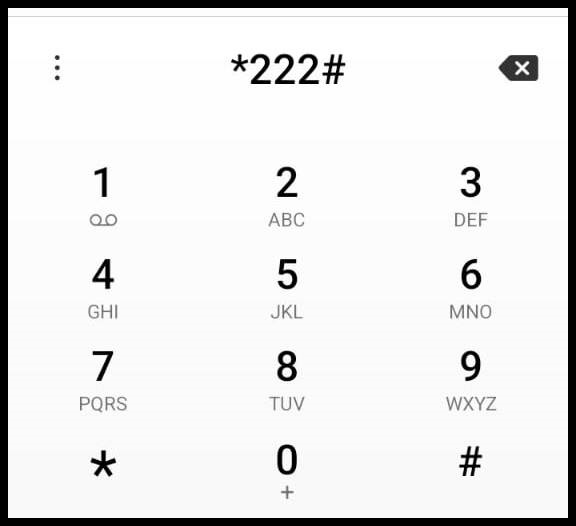
Begin by dialing *222# on your mobile phone to launch the eCitizen USSD menu. This service provides access to a wide range of government-related options in Kenya, including KRA Services, and allows you to interact with them directly from your phone without requiring an internet connection.

Begin by dialing *222# on your mobile phone to launch the eCitizen USSD menu. This service provides access to a wide range of government-related options in Kenya, including KRA Services and allows you to interact with them directly from your phone without requiring an internet connection.

Step 2: Select Option 5 – KRA Services
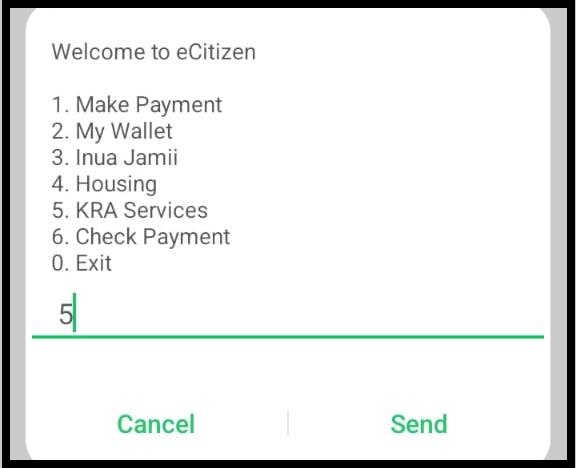
Once the menu appears on your screen, select Option 5 – KRA Services and press Send to proceed to the Kenya Revenue Authority services menu.

Once the menu appears on your screen, select Option 5 – KRA Services and press Send to proceed to the Kenya Revenue Authority services menu.

Step 3: Select Option 98 – More
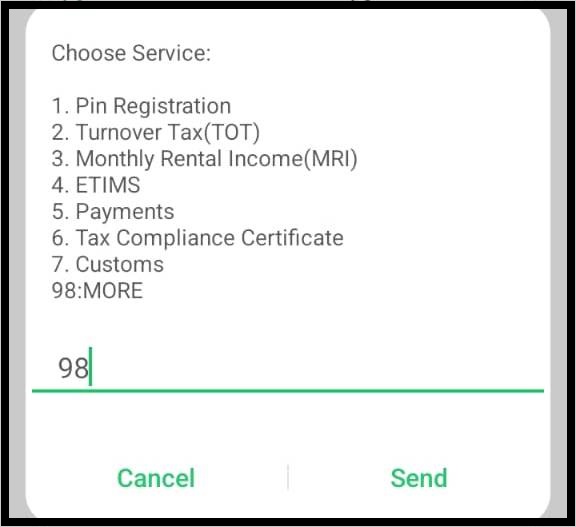
After selecting KRA Services, a list of available options will appear on your screen. Choose Option 98 – More to view additional KRA service options that are not displayed in the main menu, then press Send to continue.

After selecting KRA Services, a list of available options will appear on your screen. Choose Option 98 – More to view additional KRA service options that are not displayed in the main menu, then press Send to continue.

Step 4: Select Option 9 – Other Services
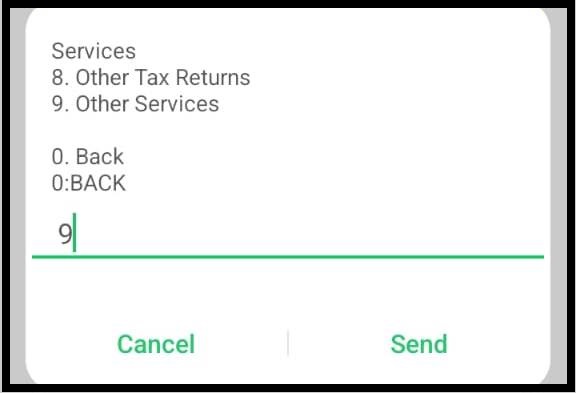
Next, select Option 9 – Other Services. This section contains additional KRA services, including the KRA PIN number retrieval option. Press Send to proceed.

Next, select Option 9 – Other Services. This section contains additional KRA services, including the KRA PIN number retrieval option. Press Send to proceed.

Step 5: Select Option 3 – PIN Retrieval
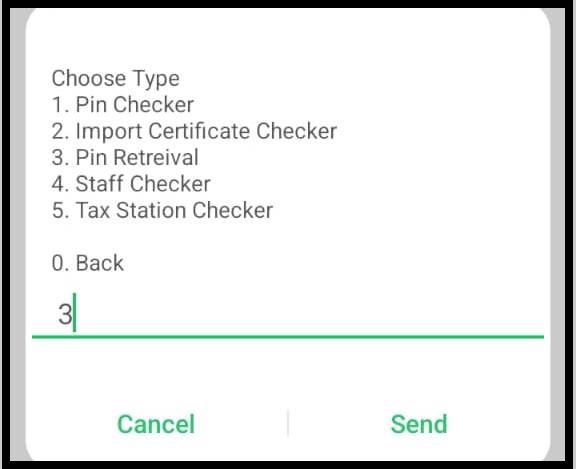
Now, select Option 3 – PIN Retrieval. This is the main step where the system initiates the process of retrieving your KRA PIN number from the KRA database using your registered National ID number. Press Send to continue.

Now, select Option 3 – PIN Retrieval. This is the main step where the system initiates the process of retrieving your KRA PIN number from the KRA database using your registered National ID number. Press Send to continue.

Step 6: Choose Taxpayer Type – Select Option 1 (Kenyan)
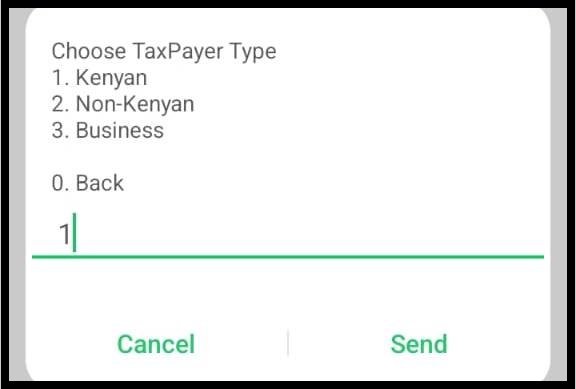
You will then be prompted to specify your taxpayer type, which may include Kenyan, Non-Kenyan, or Business. Select Option 1 – Kenyan to allow the system to correctly process and retrieve your KRA PIN information from the KRA database. Press Send to continue.

You will then be prompted to specify your taxpayer type, which may include Kenyan, Non-Kenyan or Business. Select Option 1 – Kenyan to allow the system to correctly process and retrieve your KRA PIN information from the KRA database. Press Send to continue.

Step 7: Enter Your National ID Number
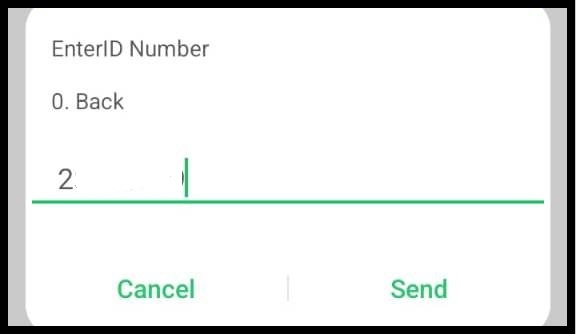
Next, the system will prompt you to enter your National ID Number. Carefully type in your ID number and double-check it for accuracy before submitting. The system uses this ID number to search the KRA database and retrieve your taxpayer information. Press Send to proceed.

Next, the system will prompt you to enter your National ID Number. Carefully type in your ID number and double-check it for accuracy before submitting. The system uses this ID number to search the KRA database and retrieve your taxpayer information. Press Send to proceed.

Step 8: View Taxpayer Details – Names and KRA PIN Number
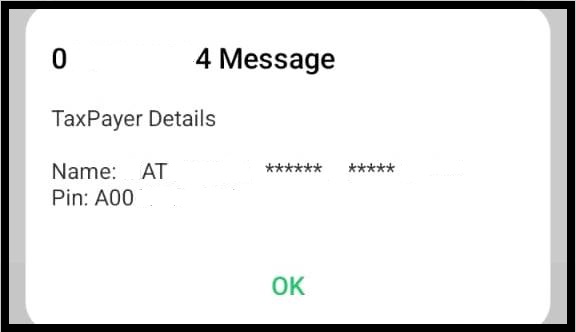
If your National ID number matches the records in the KRA database, your taxpayer details, including your registered names and KRA PIN number, will be displayed on your mobile screen. Review the information and press OK to confirm.

If your National ID number matches the records in the KRA database, your taxpayer details, including your registered names and KRA PIN number, will be displayed on your mobile screen. Review the information and press OK to confirm.

Step 9: Receive SMS with Your Taxpayer Details

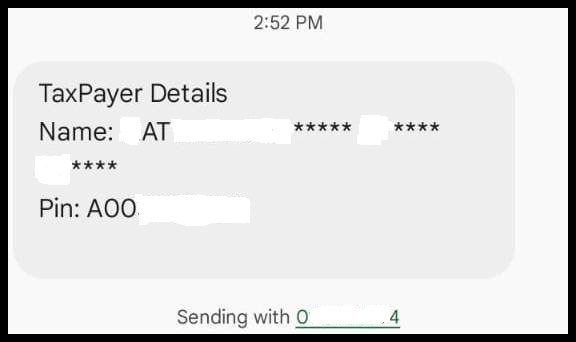
Finally, after confirming your taxpayer information on the screen, eCitizen will send you an SMS containing your complete taxpayer details, including your registered names and KRA PIN number, allowing you to have a secure copy for future reference.

Finally, after confirming your taxpayer information on the screen, eCitizen will send you an SMS containing your complete taxpayer details, including your registered Names and KRA PIN Number, allowing you to have a secure copy for future reference.


Getting KRA PIN Number via SMS

In summary, retrieving your KRA PIN number via SMS is a simple and accessible process that can be completed directly from your mobile phone without the need for internet access or visiting a KRA office. By dialing *222# and navigating through the KRA Services menu, taxpayers can quickly reach the PIN retrieval option within a few guided steps.

The process requires you to select the appropriate taxpayer type and enter your National ID number to verify your details. Once verified, your taxpayer information, including your registered names and KRA PIN number, is displayed on your screen, ensuring accuracy before completion.

Finally, the system sends an SMS containing your taxpayer details, allowing you to save or reference your KRA PIN whenever needed. This method provides a convenient, fast, and reliable way for Kenyan taxpayers to access their KRA PIN details using a basic mobile phone.


Need Your KRA PIN Certificate?

Submit Service Request

Data Collection and Processing

Till Number: 4288558

Amount: Kshs. 200

CYBER SERVICES


Chat on WhatsApp