Disclaimer
Tutorials Kenya is an independent Educational and Informational website that provides Step-by-Step KRA Tutorials In Kenya.
This step-by-step KRA Nil Returns Tutorial explains How To File KRA Nil Returns using WhatsApp, providing clear and detailed guidance through each stage of the process from start to finish to help you File KRA Nil Returns using WhatsApp in a few minutes.
READ ALSO: How To Update Mobile Number on iTax



Requirements Needed To File KRA Nil Returns using WhatsApp
To be able to successfuly file KRA Nil Returns using WhatsApp, you need to have with you the following two main requirements:
- KRA PIN Number or ID Number
- Mobile Number Linked to KRA PIN Number
Once you have the above two requirements, you will be able to file KRA Nil Returns using WhatsApp in a few minutes by following the steps outlined below.
How To File KRA Nil Returns using WhatsApp
Filing your KRA Nil Returns no longer has to be a stressful or time consuming process. Thanks to Shuru, the new KRA AI powered WhatsApp chatbot, taxpayers in Kenya can now file their KRA Nil Returns directly through WhatsApp.
By simply sending a message to the KRA WhatsApp number 0711 099 999, you can complete filing your KRA Returns from your mobile phone without downloading any additional applications or navigating multiple online portals.
The introduction of Shuru by Kenya Revenue Authority (KRA) has made tax compliance more accessible and convenient for Kenyan taxpayers. Now filing of KRA Returns can be done fast and efficiently.
If you are a student or unemployed individual in Kenya with no source of income, the KRA Shuru WhatsApp Number connects you to a guided filing experience that is fast, simple and available wherever you have internet access.
With KRA Shuru WhatsApp Bot, filing your Nil Returns is now just a few WhatsApp messages away. So, if you are looking for the fastest way to file KRA Nil Returns, then filing KRA Returns using Shuru is the ideal option for you to use.
To successfully File KRA Nil Returns using WhatsApp (Shuru), you need to carefully follow the step-by-step instructions outlined below to ensure the process is completed correctly.
Step 1: Start the Chat with KRA Shuru WhatsApp Bot
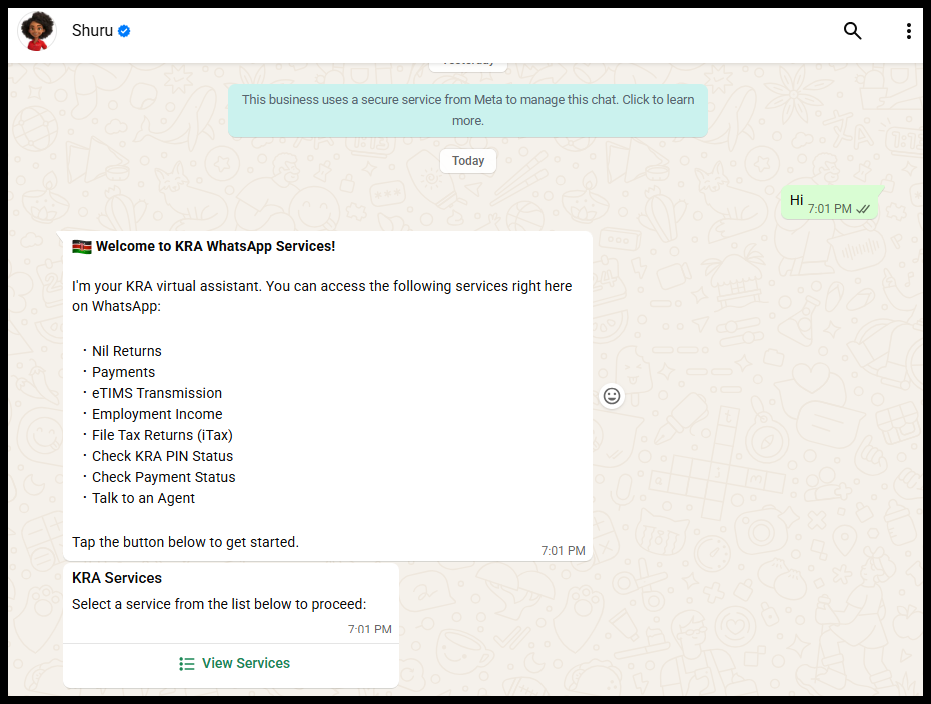
The first step in the process of filing KRA Nil Returns using WhatsApp is to save the KRA Number 0711 099 999 and say “Hi” to start the chat with “KRA Shuru WhatsApp Bot (Shuru)“.
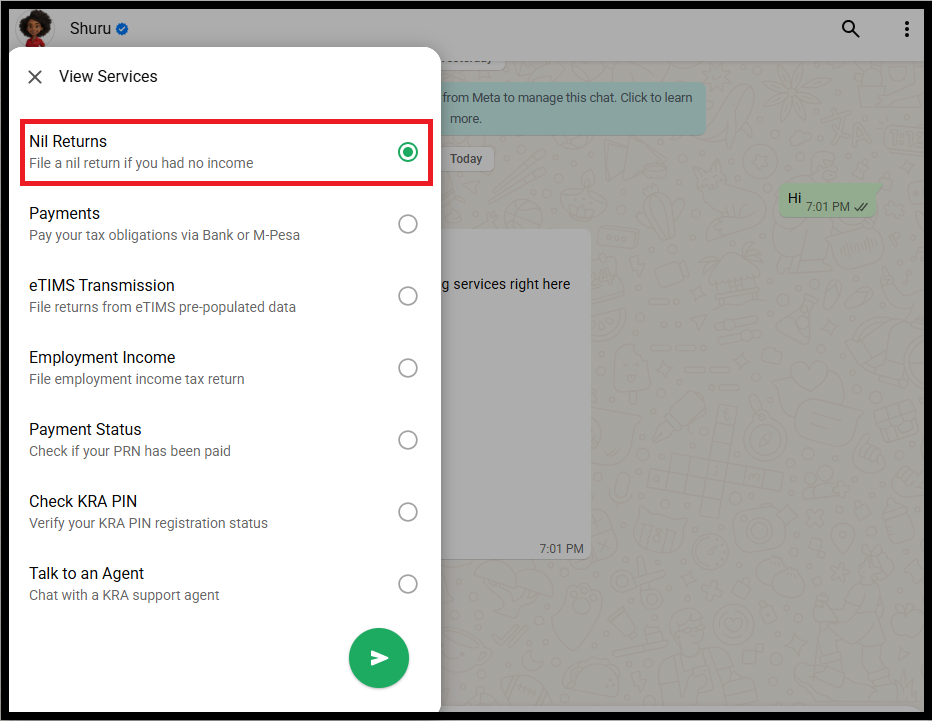
The “KRA Shuru WhatsApp Bot” will guide you straight to the filing process of “KRA Nil Returns.” From there:
- Tap View Services
- Select Nil Returns
Take note, if you have an active KRA PIN Number but no income in the year 2025, you file Nil Returns using WhatsApp.
Step 2: OTP Verification
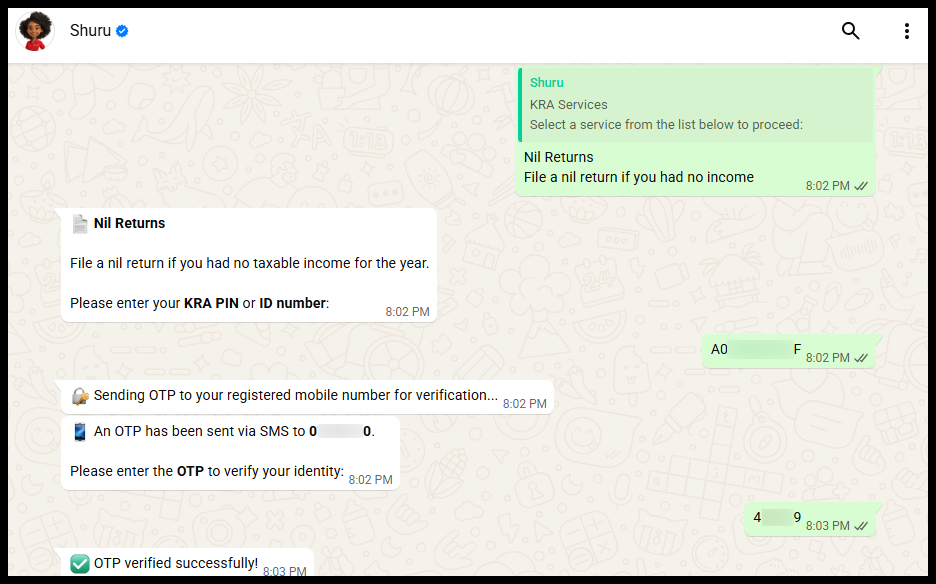
In this step, enter your “KRA PIN Number” or “National ID Number” to start the process of filing Nil Returns using Shuru. To keep your information secure, Shuru will send a “One Time Password (OTP)” to your registered mobile number on iTax. You will receive the following message from KRA Care via SMS:
Your KRA Verification code is 4****9. Do not share share this code with anyone.
Enter the “KRA OTP Verification Code” sent to your mobile number via SMS on WhatsApp to continue to the next step of filing KRA Nil Returns using Shuru.
Step 3: KRA Nil Return Confirmation
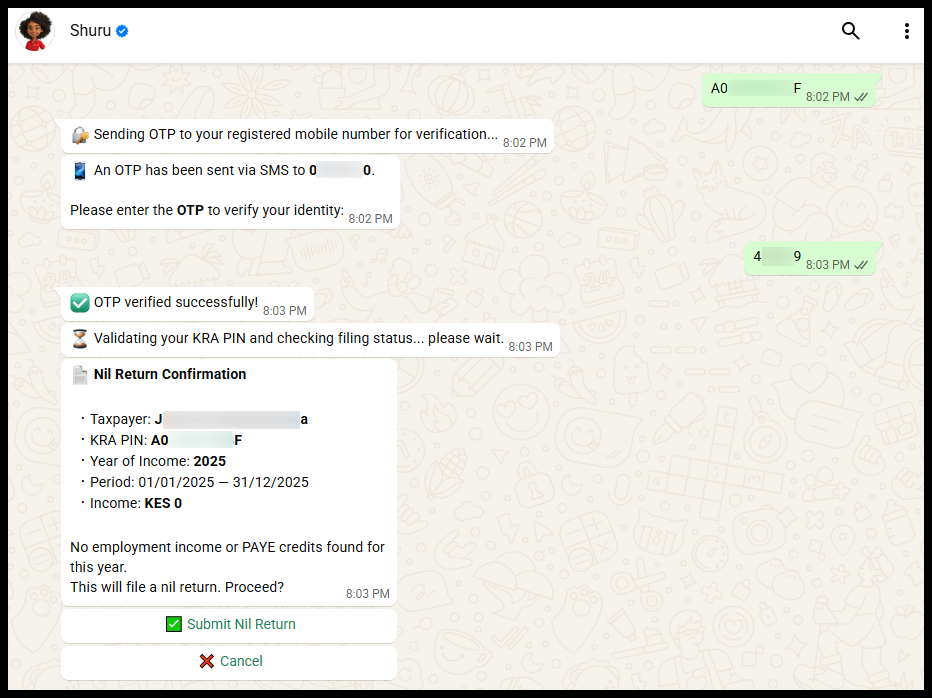
Once verified, Shuru will automatically generate your Income Summary for the year “2025” i.e if you had no income, it will display “Kshs. 0“. This lets you review your details before submitting your KRA Nil Return. Take a quick look through your summary:
- Taxpayer: Your Full Names
- KRA PIN: Your KRA PIN Number
- Year of Income: 2025
- Period: 01/01/2025 – 31/12/2025
- Income: KES 0
If you have checked and confirmed that the details are correct, just tap “Submit Nil Return” to complete the process of filing KRA Nil Returns using KRA Shuru WhatsApp Bot.
Step 4: KRA Nil Return Filed Successfully
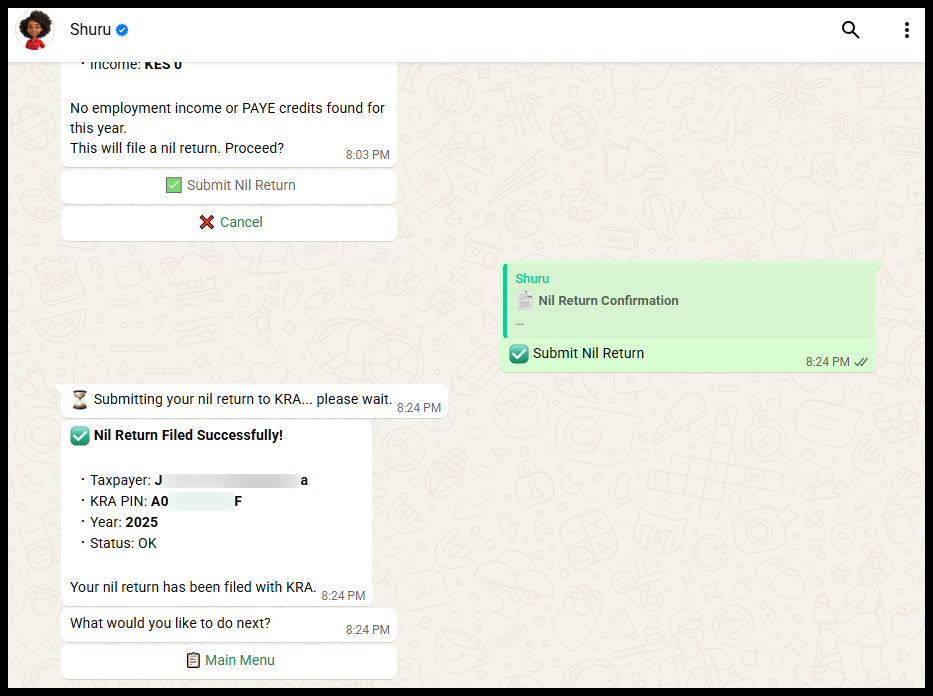
You will then receive a confirmation message once the filing of “KRA Nil Returns via WhatsApp” is successful. At this stage, you have sucessfully filed your KRA Nil Returns using WhatsApp.
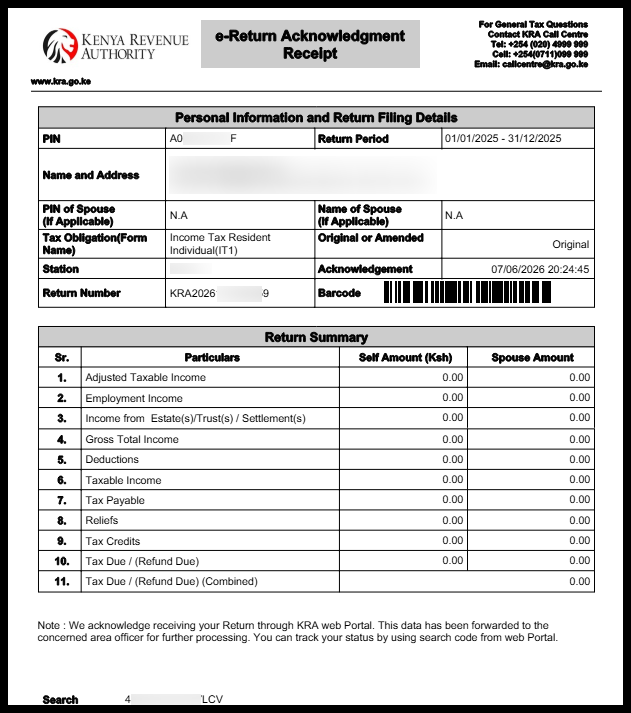
Check your SMS for the confirmation of successful KRA Nil Returns filing using WhatsApp. You will also receive the “e-Return Acknowledgement Receipt (KRA Returns Receipt)” via Email Address.
READ ALSO: How To Update Email Address on iTax
The above steps sums up the whole process of filing KRA Nil Returns using WhatsApp. The process is now simplified and taxpayers in Kenya can easily file KRA Nil Returns using Shuru i.e. KRA WhatsApp Chat Bot. Ensure that you file your KRA Nil Returns before the 30th June 2026 deadline.

Tutorials Kenya is an independent Educational and Informational website that provides Step-by-Step KRA Tutorials in Kenya. Need Help? Chat on WhatsApp: 0723 737 740.

Popular KRA Tutorials