Disclaimer
This tutorial on How To Check Grade 10 Placement Results is an independent step-by-step guide by Tutorials Kenya. We are not affiliated with or endorsed by Kenya National Examinations Council (KNEC) or any government agency in Kenya. This step-by-step tutorial is for informational and educational purposes only.
The release of Grade 10 Placement results marks a pivotal step in the transition from junior to senior secondary school for learners who sat the 2025 Kenya Junior School Education Assessment (KJSEA).
READ ALSO: How To Download Grade 10 Admission Letter
The Ministry of Education has made these placements available through the official placement portal at https://placement.education.go.ke/my-placements, empowering students and parents to confirm senior school assignments quickly and securely.
Understanding How To Check Grade 10 Placement results online is essential for learners, guardians, and educators as the new academic year approaches.
Through the placement platform, you can access your assigned senior school and download your placement information directly from the Kenya Education Management Information System (KEMIS).
The process is designed to be transparent, efficient, and user-friendly. This guide will walk you through the exact steps required to check your Grade 10 Placement on the official portal, what information you need to have ready, and how to interpret the results once they are displayed.
With clear instructions and practical tips, you’ll be able to confirm your placement with confidence and prepare for the next phase of your education.
Requirements Needed To Check Grade 10 Placement Results
To be able to check Grade 10 Placement online, you need to have your Assessment Number and Junior School KNEC Code.
-
Assessment Number
To check your Grade 10 Placement, you must have the learner’s assessment number used during the KJSEA examinations. This number uniquely identifies the candidate in the Ministry of Education and KNEC systems. Entering the correct assessment number ensures that the placement portal retrieves the accurate senior secondary school assignment for the learner.
-
Junior School KNEC Code
The second requirement is the Junior School KNEC code, which identifies the school where the learner sat the KJSEA assessment. This code helps verify the candidate’s school records and confirms eligibility for placement. Ensure the KNEC code is entered correctly, as incorrect details may prevent access to the Grade 10 Placement results on the official portal.
How To Check Grade 10 Placement Results
The following are the main steps that you need to follow in the process of How To Check Grade 10 Placement Results for a candidate.
Step 1: Visit Grade 10 Placement Platform
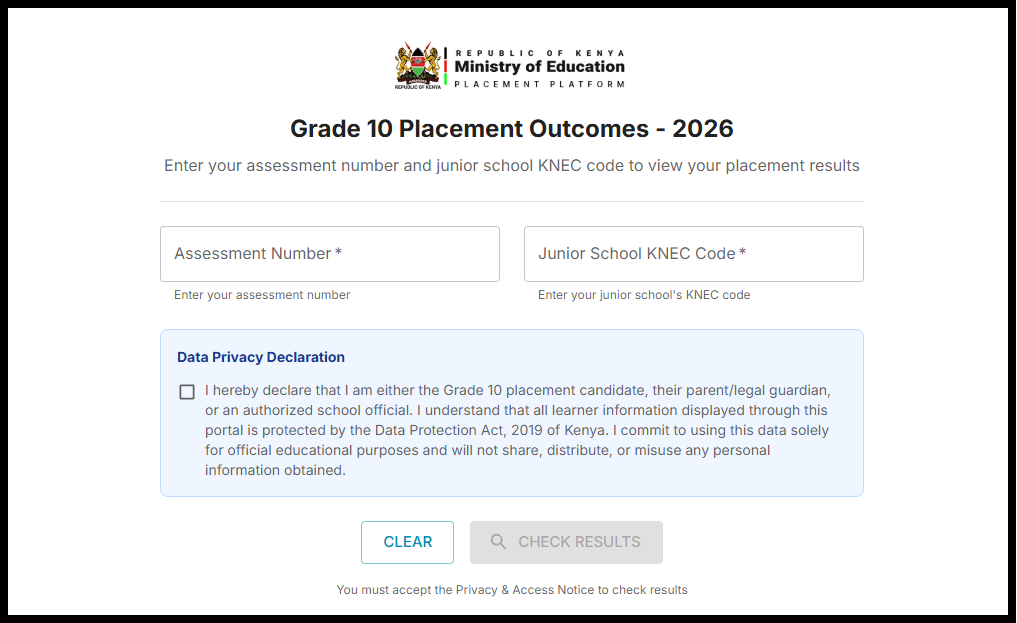
To begin the process of checking your Grade 10 Placement, open a web browser and visit the Grade 10 School Placement Platform at https://placement.education.go.ke/my-placements. Ensure you have a stable internet connection and use a modern browser for the best experience. This portal is managed by the Ministry of Education and provides secure access to placement information.
Step 2: Enter Assessment Number
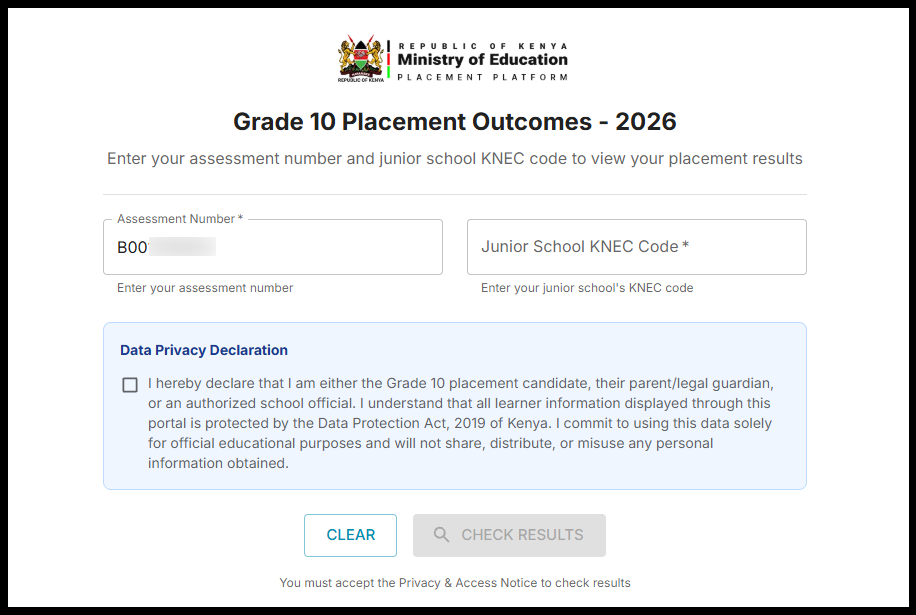
Once on the platform, enter the learner’s Assessment Number exactly as it appears on official KJSEA documents. This number is used to uniquely identify the candidate within the placement system. Entering the correct assessment number is essential for retrieving accurate Grade 10 Placement results.
Step 3: Enter Junior School KNEC Code
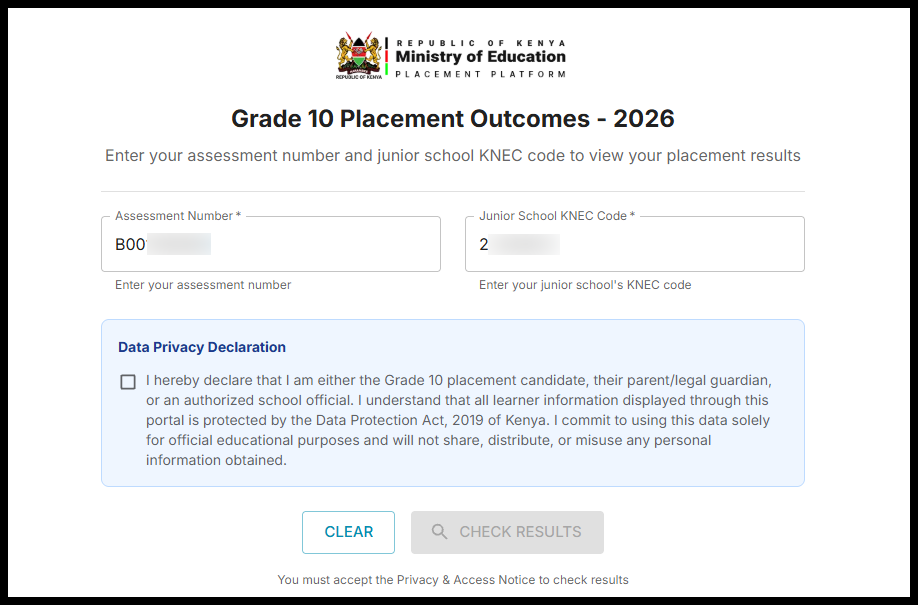
Next, input the Junior School KNEC Code for the school where the candidate sat the KJSEA assessment. This code verifies the learner’s school records and links the assessment number to the correct institution. Double-check the code to avoid errors during the placement search.
Step 4: Data Privacy Declaration
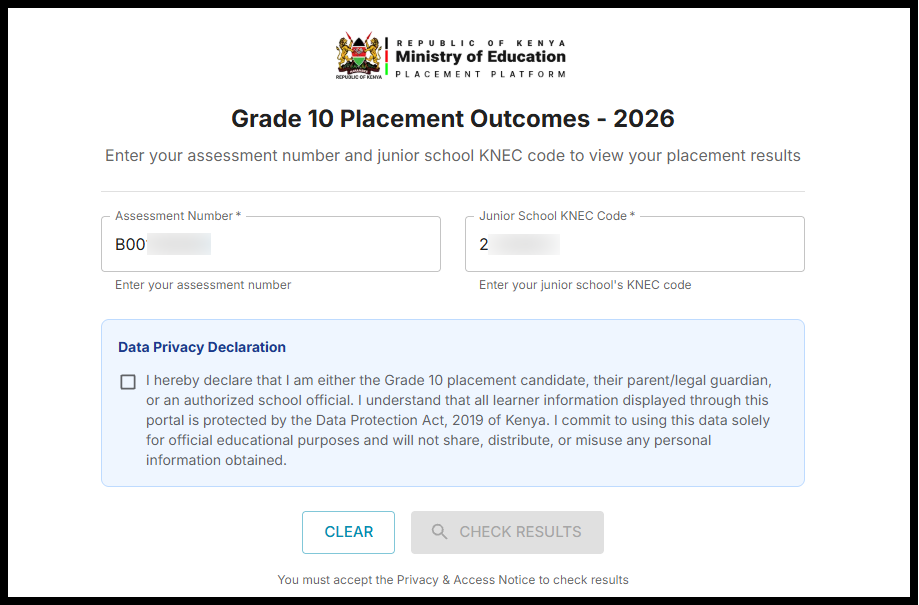
Before proceeding, carefully read the Data Privacy Declaration displayed on the platform. This section outlines how learner information is protected and used strictly for placement purposes. You must acknowledge this declaration to continue accessing the Grade 10 Placement results.
I hereby declare that I am either the Grade 10 placement candidate, their parent/legal guardian, or an authorized school official. I understand that all learner information displayed through this portal is protected by the Data Protection Act, 2019 of Kenya. I commit to using this data solely for official educational purposes and will not share, distribute, or misuse any personal information obtained.
Step 5: Click Check Results
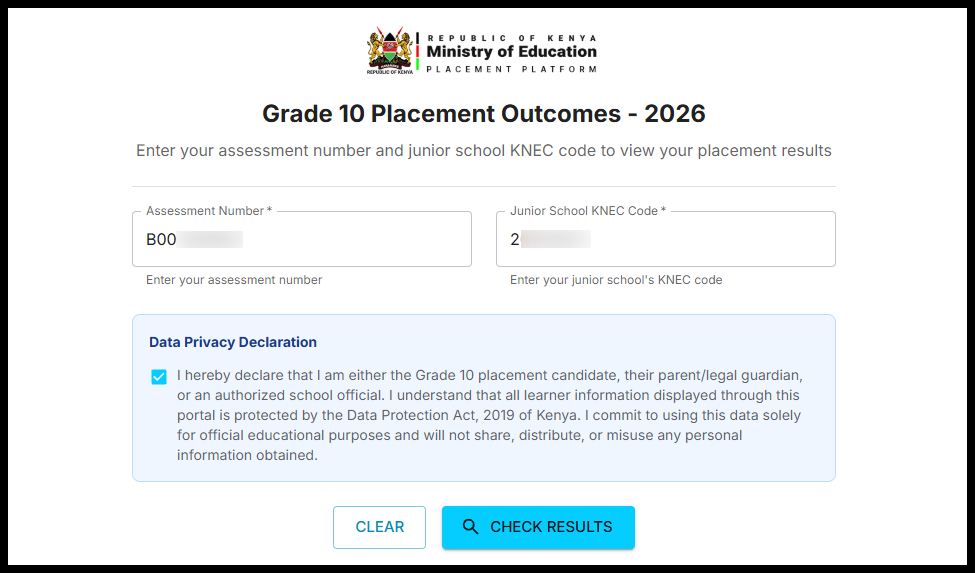
After entering all required details and accepting the privacy declaration, click the Check Results button. The system will process the information and search for the learner’s placement record. Ensure all details are correct before submitting to avoid delays or system errors.
Step 6: Grade 10 Placement Results
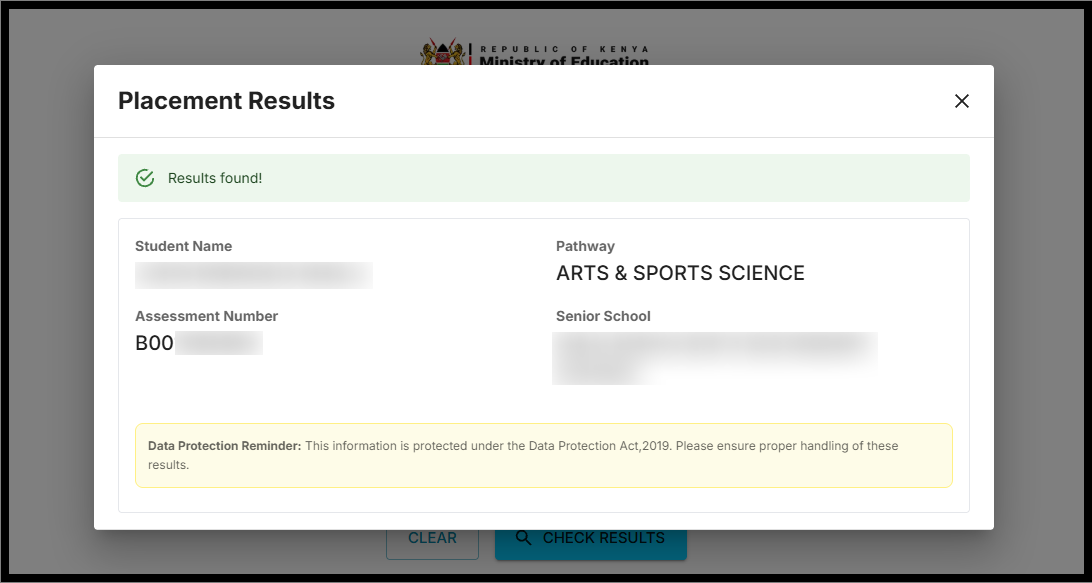
Once the search is complete, the Grade 10 Placement results will appear on the screen, showing the assigned senior secondary school. You may download or print the placement details for future reference. Reviewing the placement promptly helps learners and parents prepare for reporting and admission requirements. By following the steps outlined above, learners and parents can easily check and confirm their Grade 10 Placement online through the official Ministry of Education platform.
READ ALSO: How To Check 2025 KJSEA Results
Ensure that the correct assessment number and junior school KNEC code are used for accurate results. Once the placement details are displayed, it is advisable to save or print the information for future reference. Accessing your Grade 10 Placement early allows for timely preparation for reporting, admission, and the next stage of senior secondary education.

Tutorials Kenya publishes clear step-by-step tutorials designed to help Kenyans understand online processes. Our step-by-step tutorials are written in very simple language to make online processes easier for all Kenyans.