Disclaimer
This tutorial on How To Check KRA PIN using KRA PIN Checker is an independent step-by-step guide by Tutorials Kenya. We are not affiliated with or endorsed by Kenya Revenue Authority (KRA) or any government agency in Kenya. This step-by-step tutorial is for informational and educational purposes only.
The KRA PIN Checker is an online tool provided by the Kenya Revenue Authority (KRA) that allows you to verify the authenticity of a KRA PIN. With this tool, you can confirm whether a specific PIN is genuine, meaning it has been officially generated by the KRA – Domestic Taxes Department system and is currently in Active status. The PIN Checker provides basic taxpayer information, helping individuals and businesses ensure that the PIN in question is valid and recognized by KRA.
READ ALSO: How To Download Tax Compliance Certificate (TCC)
Checking your KRA PIN using the PIN Checker is crucial because it ensures that your PIN is valid and correctly registered for your tax obligations on iTax. This verification helps prevent errors or complications when filing returns, making payments, or conducting any tax-related transactions. Ensuring your PIN is genuine safeguards you from potential penalties and confirms that all your tax records are properly aligned with KRA’s system.
Submit Service Request
Waiting Duration: 5 minutes
You will receive your:
- KRA PIN Number
- KRA PIN Certificate
Via: Email Address and WhatsApp
How To Check KRA PIN using KRA PIN Checker
To check your KRA PIN Number online using KRA PIN Checker functionality on iTax (KRA Portal), follow the outlined steps below.
-
Step 1: Visit iTax (KRA Portal)
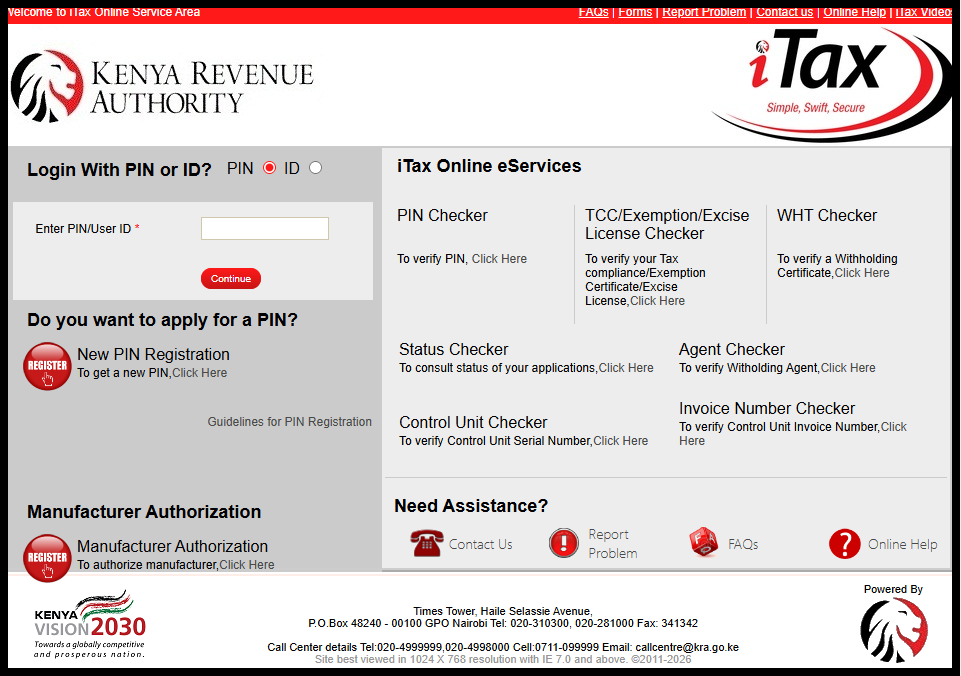
The first step in the process of checking KRA PIN Number online using KRA PIN Checker is to visit iTax (KRA Portal) using the link – https://itax.kra.go.ke/KRA-Portal/
-
Step 2: Click on KRA PIN Checker
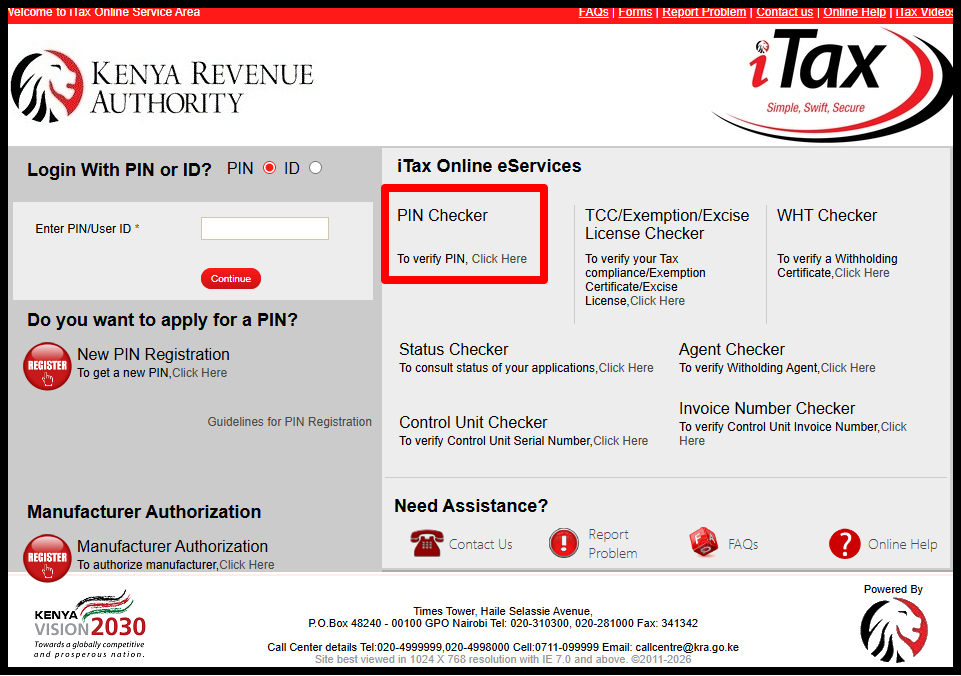
Once on iTax (KRA Portal), click on the “PIN Checker” link to start the process of checking your KRA PIN Number online using the KRA PIN Checker feature.
-
Step 3: Enter KRA PIN Number
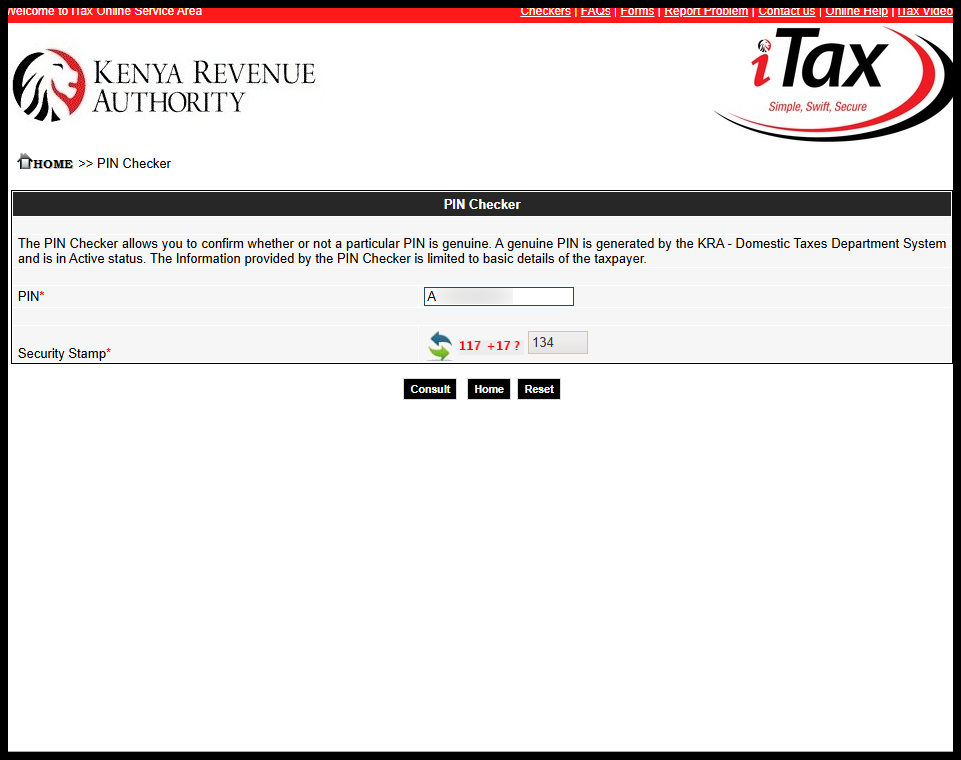
In this step, enter your “KRA PIN Number” and solve the arithmetic question (security stamp). Once you have done so, click on the “Consult” button.
-
Step 4: KRA PIN Checker Results
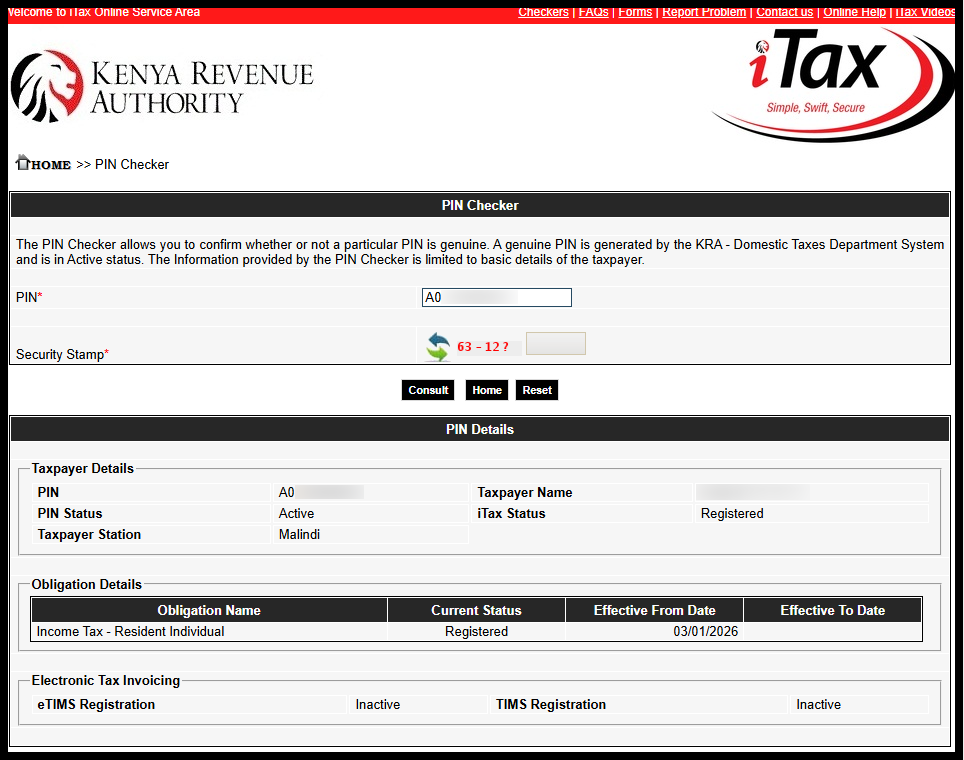
The last and most important step in checking KRA PIN Number using KRA PIN Checker is the results of the check i.e. KRA PIN details. This is categorized into 3 sections: Taxpayer Details, Obligation Details and Electronic Tax Invoicing.
a. Taxpayer Details: KRA PIN Number, Taxpayer Name, KRA PIN Status, iTax Status and Taxpayer Station.
b. Obligation Details: Obligation Name, Current Status, Effective From Date and Effective To Date.
c. Electronic Tax Invoicing: eTIMS Registration (Active or Inactive) and TIMS Registration (Active or Inactive).
Submit Service Request
Waiting Duration: 5 minutes
You will receive your:
- KRA PIN Number
- KRA PIN Certificate
Via: Email Address and WhatsApp
Once you have verified your KRA PIN using the PIN Checker, you can be confident that it is genuine and properly registered in the KRA system. This verification not only confirms the validity of your PIN but also helps prevent potential issues when filing returns, making payments, or engaging in any tax-related transactions on iTax. Regularly checking your PIN ensures that your tax records remain accurate and up to date.
READ ALSO: How To Apply for Tax Compliance Certificate (TCC)
If you find that your PIN is not valid or inactive, it is important to take immediate steps to resolve the issue. You may need to update your details on iTax or contact KRA for assistance to ensure that your PIN is correctly registered. By keeping your PIN verified and active, you safeguard yourself from errors, penalties, and delays in all tax-related matters.

Tutorials Kenya publishes clear step-by-step tutorials designed to help Kenyans understand online processes. Our step-by-step tutorials are written in very simple language to make online processes easier for all Kenyans.